

Interpreting Items
Learn how to understand and interpret technology items on the radar.
This page explains how to understand and interpret the technology items displayed on the Tech Radar for Compass.
Item Representation
Technologies on the radar are represented as "blips" - small shapes positioned in the appropriate quadrant and ring.
The position, shape, and color of a blip provide important information about a technology's status and classification.
Blip Shapes
The shape of a blip indicates its status:
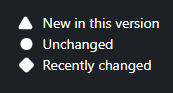
- Circle - Unchanged status since the last radar update
- Triangle - New or moved since the last radar update (has the "new" or "changed" flag)
- Diamond - Recently changed in the most recent radar update
Blip Colors
The color of a blip typically corresponds to its quadrant:
- Each quadrant has its own color (configurable by administrators)
- This makes it easier to visually associate blips with their quadrants
Blip Position
The position of a blip indicates:
- Quadrant - The category the technology belongs to
- Ring - The adoption stage of the technology
- Clustering - Similar or related technologies may be positioned near each other
Item Details
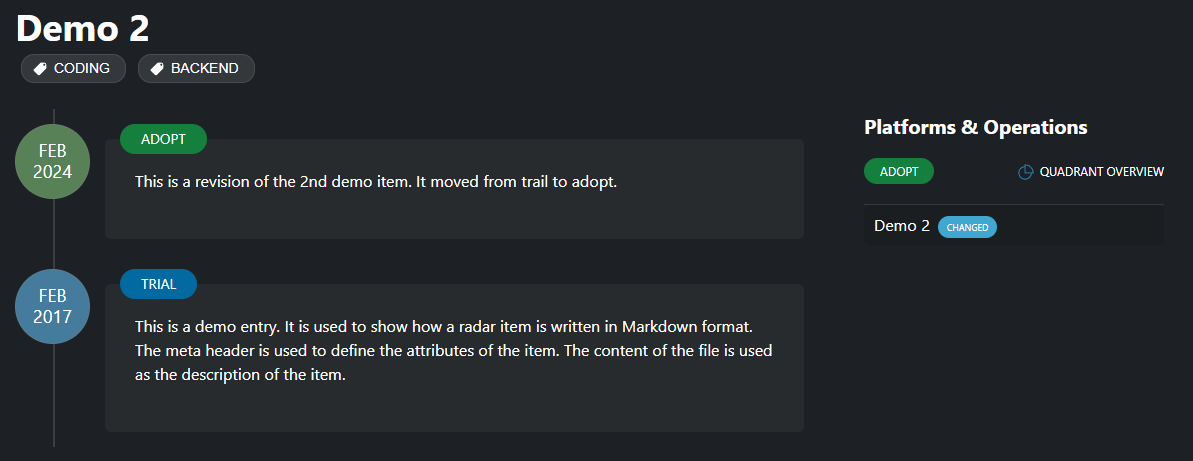
When you click on a blip or item in the list, you'll see detailed information about the technology.
Basic Information
The basic information includes:
- Name - The name of the technology
- Quadrant - The category it belongs to
- Ring - Its current adoption stage
- Status - Whether it's new, changed, or unchanged
Description
The description provides:
- An explanation of what the technology is
- Its key features and benefits
- Use cases and applications
- Potential limitations or considerations
History
The history section shows:
- How the technology has moved between rings over time
- When changes occurred
- Previous descriptions or assessments
This historical context helps you understand the evolution of the technology within your organization.
Tags
Tags provide additional categorization:
- Technologies may have multiple tags
- Tags can represent use cases, platforms, languages, etc.
- Tags are clickable to filter the radar by that tag
Status Flags
Status flags indicate the state of items on the radar:
New Flag
The "new" flag indicates:
- The technology has been added to the radar in the current version
- It's appearing for the first time
- It's worth paying attention to as a new addition
New items are typically represented by triangles on the radar.
Ring Interpretation
Understanding what each ring means is crucial for interpreting the radar:
Adopt Ring
Technologies in the Adopt ring:
- Are proven and mature
- Have been successfully used in production
- Are recommended for use in new projects
- Have organizational support and expertise
Trial Ring
Technologies in the Trial ring:
- Show promise and potential value
- Have been tested in limited contexts
- Are worth exploring in projects
- May have some limitations or unknowns
Assess Ring
Technologies in the Assess ring:
- Are worth exploring to understand their impact
- Are not yet ready for production use
- Require investigation and evaluation
- May be emerging or evolving rapidly
Hold Ring
Technologies in the Hold ring:
- Should be avoided for new projects
- May be legacy technologies being phased out
- Could have security, performance, or support issues
- Might be replaced by better alternatives
The exact meaning of rings may vary depending on your organization's configuration. Always check the ring descriptions provided in your radar.
Making Decisions
When using the radar to inform technology decisions:
- Consider the quadrant - Is this the right type of technology for your needs?
- Check the ring - Is this technology recommended for use?
- Read the description - Understand the context and considerations
- Review the history - See how the assessment has changed over time
- Look at related technologies - Are there alternatives in more favorable rings?
The radar is a guide, not a mandate. Use it alongside other factors like team expertise, project requirements, and business context when making technology decisions.